



Managing invoices as a security guard has never been easier. Imperial Security's dedicated security invoice maker is a game-changing web app designed specifically for security professionals who need to create professional invoices quickly and efficiently. This free invoice template tool streamlines the entire invoicing process, helping security guards get paid faster whilst maintaining a professional image with every client.
Why Security Guards Need a Dedicated Invoice Generator
Security services require meticulous documentation of hours worked across multiple sites. Traditional methods using Excel, Google Sheets, or Google Docs can be time-consuming and error-prone. Imperial Security's invoice maker addresses these challenges by providing a specialised security guard invoice template that captures all essential details whilst presenting clear payment terms to your client base.
Whether you're working night shifts at various locations or managing multiple security assignments, this invoice online tool ensures you never miss documenting your work. The template automatically calculates totals based on your hourly rates, eliminating common billing errors that can delay payment.
Key Features That Streamline Your Billing Process
Imperial Security's web app offers an intuitive interface that makes creating a security invoice remarkably easy. Simply fill in your details once, and the system saves them for future use. Here's what makes this security guard invoice template exceptional:
Real-Time Preview and Professional Branding
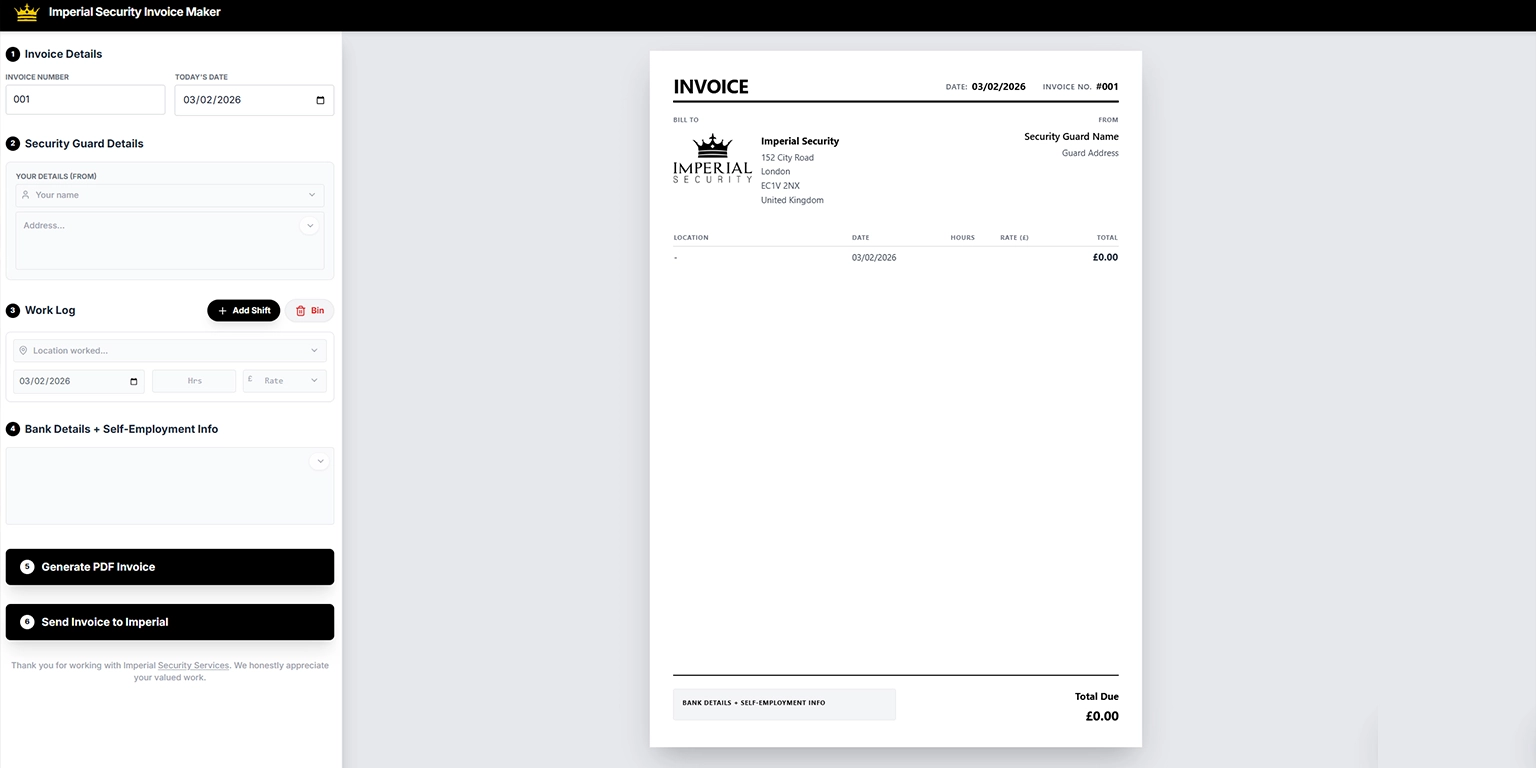
As you enter information, watch your professional invoice take shape in real-time. The live preview shows exactly what your client will receive, ensuring every line item is correct before you download or send it. Each security invoice features the Imperial Security logo and company details, creating a consistent, professional brand image. The template includes all necessary business information, from the London address (152 City Road, EC1V 2NX) to contact details.
Multiple Shift Tracking: The Work Log section allows you to add multiple shifts with ease. Click "Add Shift" to include each location worked, date, hrs on site, and your rate. The Bin feature lets you remove entries if needed, giving you complete control over your invoice details.
Automatic Calculations: Enter your hours and rates, and the invoice generator calculates the total automatically. This feature ensures accuracy across all services provided, from standard monitoring duties to equipment-related charges.
Bank Details Integration: The tool includes a dedicated section for bank details and self-employment info, crucial for security guards working as independent contractors. This ensures clients have everything needed to process payment quickly.
Creating Your Security Guard Invoice in Minutes
The Imperial Security invoice maker transforms invoice creation from a tedious task into a quick, simple process. Here's how to create professional invoices from scratch:
Setting Up Your Invoice Information
Step 1: Invoice Details Enter your invoice number and today's date. The system automatically generates sequential invoice numbers, ensuring you maintain clear records for all documents.
Step 2: Security Guard Details Fill in your details in the "Your Details (From)" section. Add your name and address – this information saves automatically for future invoices, so you simply need to enter it once.
Adding Work Log Entries and Payment Details
Step 3: Work Log Entries This is where the tool truly shines. For each assignment, click "Add Shift" and enter:
- Location worked (site name or client location)
- Service dates
- Hours worked (hrs)
- Your hourly rate (£)
The template allows multiple line items, perfect for security guards who work various sites throughout the billing period. Each entry displays clearly in the invoice preview with the calculated total.
Step 4: Bank and Self-Employment Information Complete the bank details section to ensure smooth payment processing. This section accommodates self-employed security professionals who need to include additional business information.
Step 5: Generate and Send Choose between two options:
- "Generate PDF Invoice" – download your security guard invoice as a professional PDF document ready to print or email
- "Send Invoice to Imperial" – submit directly through the system for faster processing
Benefits for Your Security Business
Using Imperial Security's free invoice template delivers tangible advantages that help you get paid faster and maintain better business records:
Time Savings: Creating invoices manually wastes valuable hours. This free tool generates ready-to-send documents in minutes, not hours. The template eliminates repetitive work, letting you focus on billable security services rather than administrative tasks.
Professional Presentation: Every invoice maintains consistent, professional formatting. Clear line items showing location, date, hours, rate, and total ensure clients understand exactly what they're paying for. This transparency builds trust and encourages prompt payment. For security companies looking to build the same level of professionalism across their wider online presence, working with a website development company can help create a website that clearly presents services, credentials and contact information to prospective clients.
Accurate Record Keeping: Download and save each invoice as a PDF for your business documents. This creates an organised digital trail that simplifies tax preparation and helps you monitor your earnings across different sites and dates.
Error Reduction: Automatic calculations eliminate arithmetic mistakes. The system ensures your totals match your hours and rates every time, preventing disputes and payment delays.
Mobile Accessibility: Access the web app from any device with an internet connection. Whether you're at a client site using your phone or at home on your computer, your invoicing tools are ready when needed.
Customisation for Different Security Services
The Imperial Security template adapts to various security guard scenarios. Whether you provide:
- Static site monitoring with regular hours
- Mobile patrol services across multiple locations
- Event security with varying rates
- Equipment installation and monitoring fees
- Incident reports requiring additional charges
The flexible work log accommodates all services. Add as many shifts as needed, adjust rates for different assignments, and include special fees or charges as separate line items.
Why This Free Tool Stands Out
Imperial Security's invoice generator offers several advantages over generic invoice templates:
Industry-Specific Design: Built specifically for security guard invoicing needs, the template includes all relevant fields without unnecessary clutter. The focus on location, hours, and rates reflects what security professionals actually bill for.
No Hidden Costs: The tool is completely free. There's no subscription fee, no premium tier, and no limit on how many invoices you can create. Every feature is available to all users at no cost.
Instant PDF Generation: Unlike some free invoice templates that require email submission or watermarked downloads, Imperial Security's tool generates clean, professional PDF files immediately.
Direct Submission Option: The "Send Invoice to Imperial" feature streamlines billing for security guards working with Imperial Security, creating a seamless connection between service delivery and payment processing.

Getting Started Today
Security professionals deserve efficient tools that match the professionalism of their services. Imperial Security's invoice maker eliminates the frustration of manual billing, replacing it with a streamlined process that takes minutes instead of hours.
Visit the Imperial Security website to access the free security invoice generator. No registration barriers, no complicated setup – simply navigate to the invoice maker, fill in your details, add your shifts, and generate your first professional security guard invoice.
Stop wasting time on spreadsheets and complicated billing software. Whether you need a security invoice template for one-off assignments or want to streamline regular billing across multiple sites, this dedicated tool provides everything security guards need to create clear, accurate invoices that ensure prompt payment.
The invoice online tool represents Imperial Security's commitment to supporting security professionals with practical resources that make business management easier. Start using the free invoice generator today and experience how simple professional invoicing can be.